Architecture & Workflow
A visual map of the whole project: what you're building (the reference architecture) and the order you build it in (the onboarding workflow). Every box is tagged with the module (M1, M2, …) that covers it, so you can jump straight to the how-to.
Reference architecture
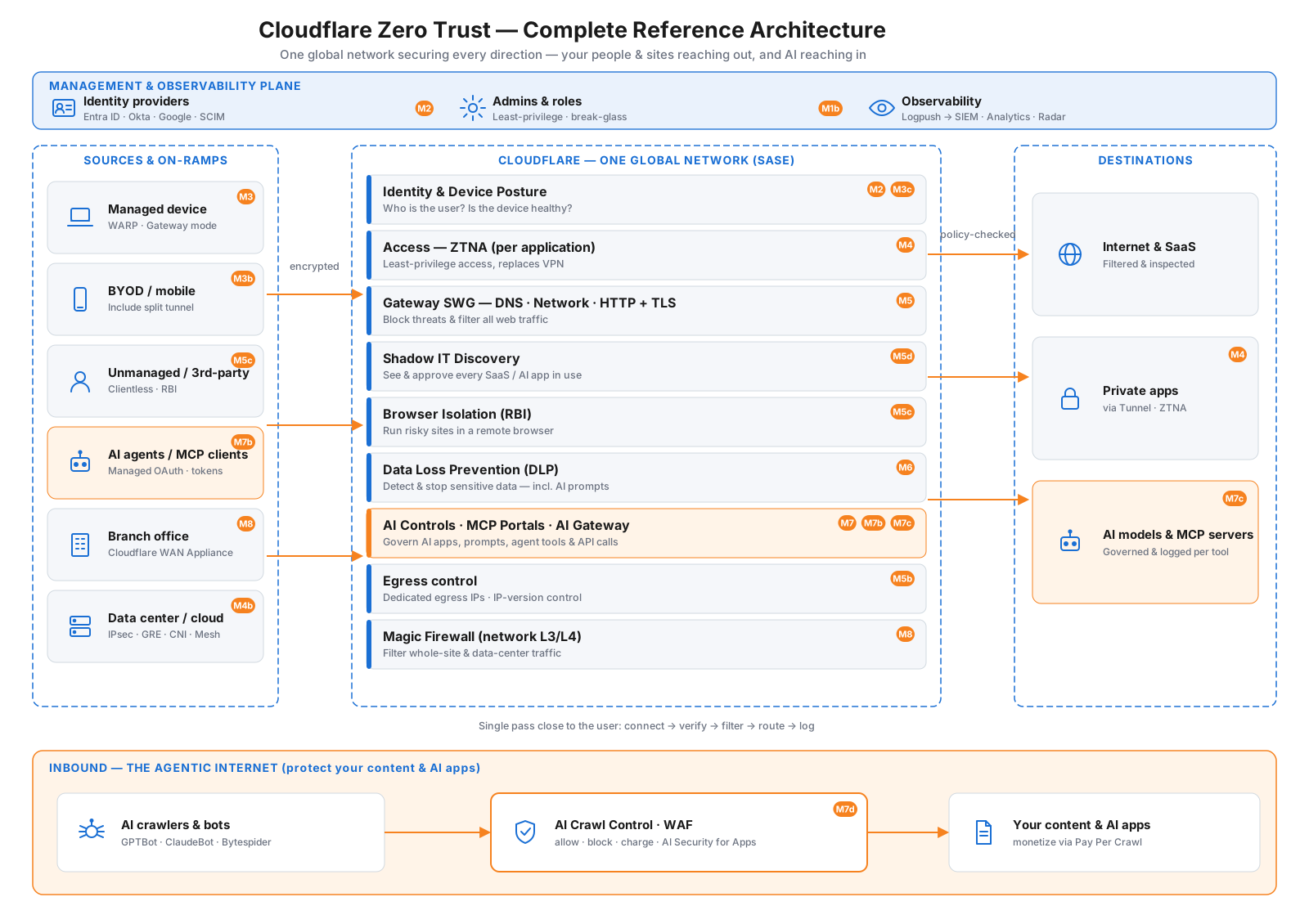
The complete picture of what you're building. It secures both directions: your people, devices, and sites reaching out (the main spine), and AI crawlers reaching in to your content (the bottom lane) — all on one global network, with a management plane across the top.
How to read it
- Top — Management & observability plane: the cross-cutting controls — your identity providers (Entra ID / Okta / Google + SCIM, M2), admins & roles (least-privilege + break-glass, M1b), and observability (Logpush → SIEM, Analytics, Radar).
- Left — Sources & on-ramps: everything that connects to Cloudflare — managed devices (WARP), BYOD, unmanaged/clientless, AI agents / MCP clients, branch offices (Cloudflare WAN Appliance), and data centers/cloud (IPsec · GRE · CNI · Mesh).
- Center — Cloudflare's one global network (SASE): each request passes through the full security stack in a single pass close to the user — identity & posture, ZTNA (Access), Gateway SWG, Shadow IT discovery, Browser Isolation, DLP, AI Controls · MCP Portals · AI Gateway, egress control, and Magic Firewall.
- Right — Destinations: the internet & SaaS, your private apps (via Tunnel/ZTNA), and AI models & MCP servers — all reached securely.
- Bottom — Inbound (the Agentic Internet): the other direction — AI crawlers & bots hitting your public content, governed by AI Crawl Control · WAF · AI Security for Apps (allow / block / charge), so you can even monetize access with Pay Per Crawl (M7d).
Onboarding workflow
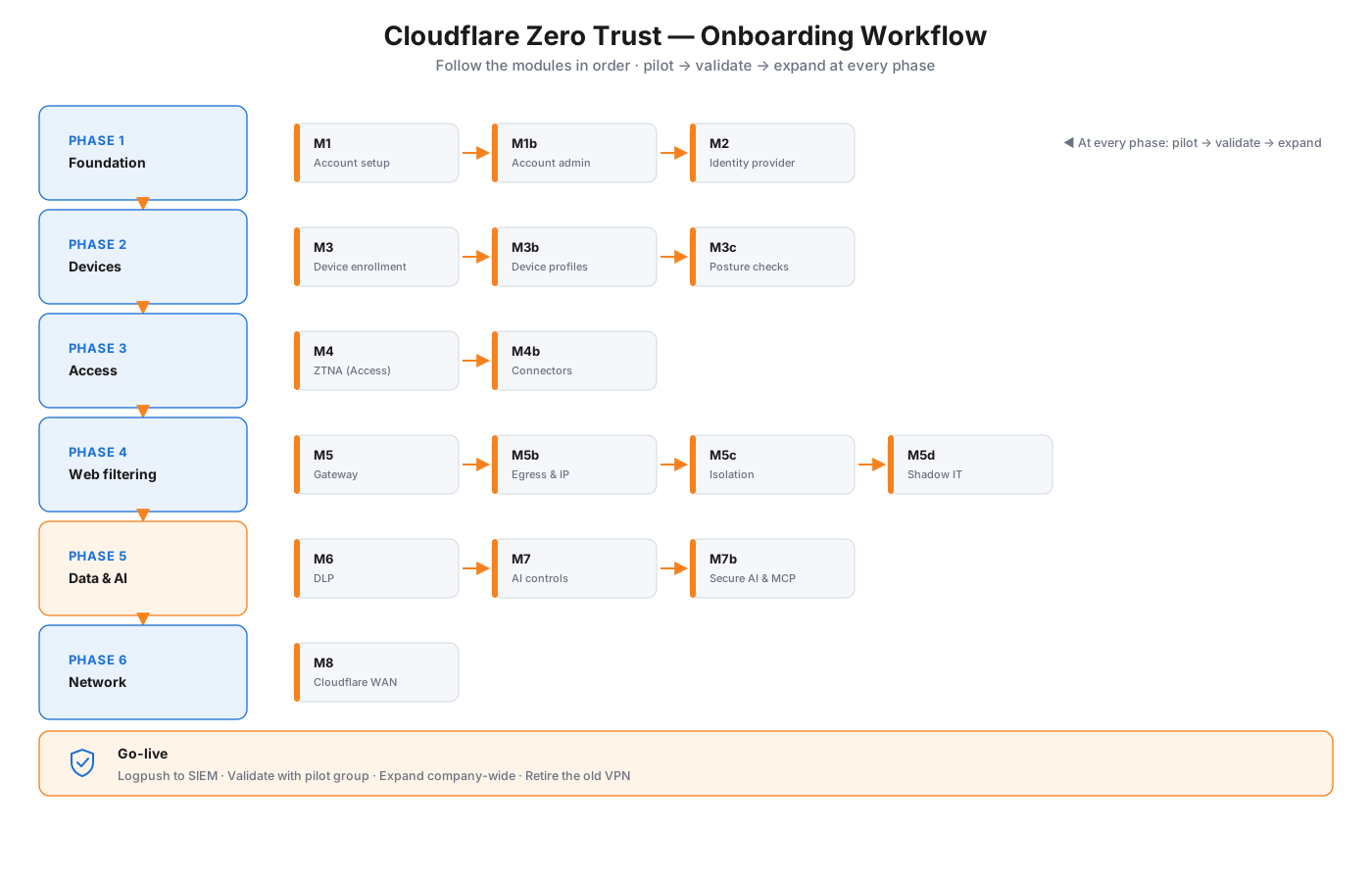
The order to deploy in. Each phase builds on the last, and the golden rule applies throughout: pilot → validate → expand.
The phases
- Foundation — account, admins, identity (M1 · M1b · M2)
- Devices — enroll the Cloudflare One Client, device profiles, posture (M3 · M3b · M3c)
- Access — publish private apps behind ZTNA, connect networks (M4 · M4b)
- Web filtering — Gateway, egress/IP control, Browser Isolation, Shadow IT (M5 · M5b · M5c · M5d)
- Data & AI — DLP, AI controls, secure AI & MCP (M6 · M7 · M7b)
- Network — connect offices and data centers with Cloudflare WAN (M8)
Then go-live: stream logs to your SIEM, validate with a pilot group, expand company-wide, and retire the old VPN.
AI & MCP security — defense in depth
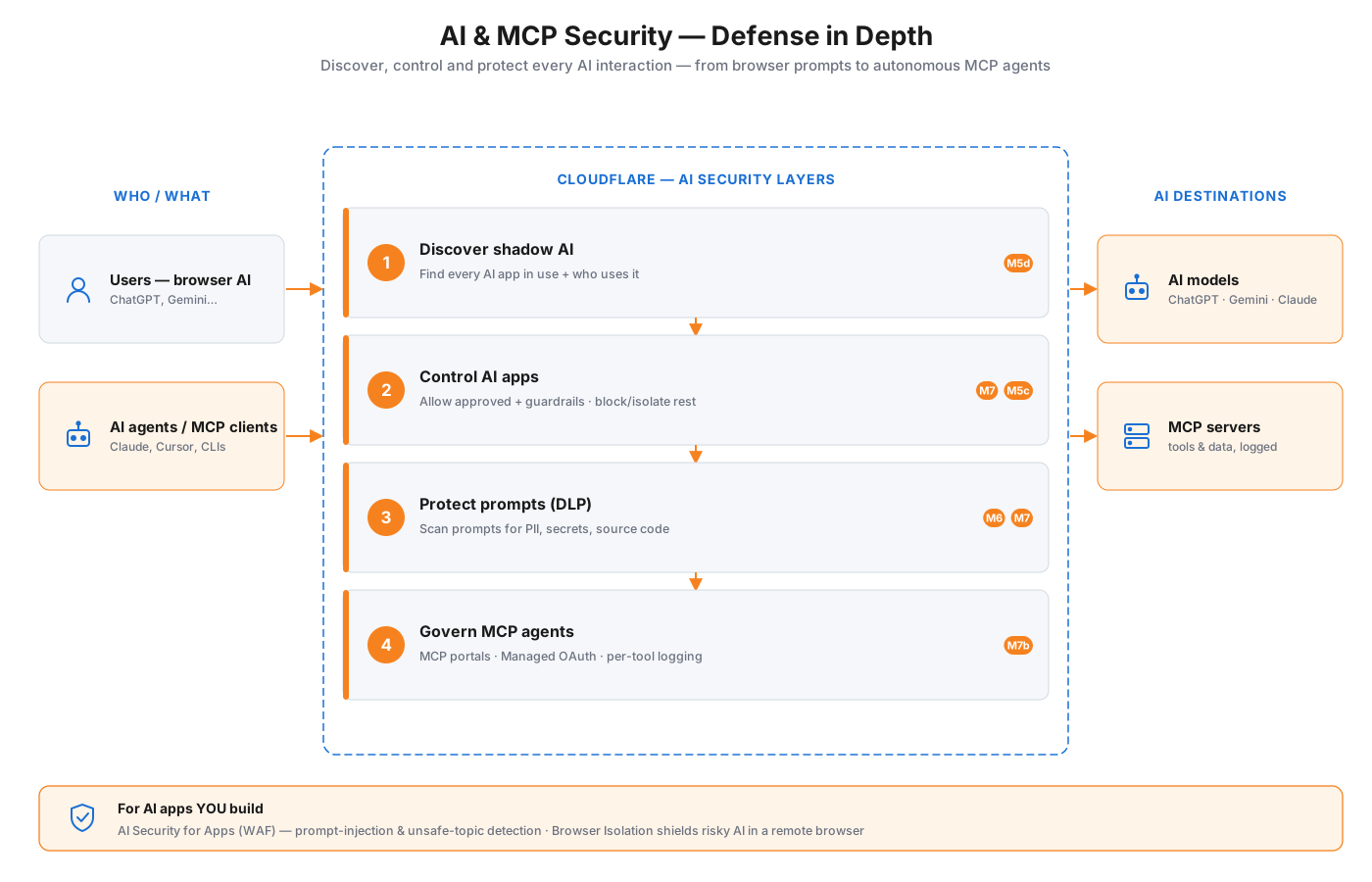
Governing AI is a first-class part of this platform, not an afterthought. As employees adopt AI tools and autonomous MCP agents connect to your systems, Cloudflare applies four layers to every AI interaction — discover what's used, control the apps, protect what goes into prompts, and govern the agents themselves — with a separate WAF layer for the AI apps you build.
The four layers
- Discover shadow AI — find every AI app in use and who's using it (M5d)
- Control AI apps — allow approved tools with guardrails; block or isolate the rest (M7 · M5c)
- Protect prompts — DLP scans what users type into AI for PII, secrets, and source code (M6 · M7)
- Govern MCP agents — MCP portals put agents behind Access with Managed OAuth and per-tool logging (M7b)
And for AI applications you build and expose, AI Security for Apps (WAF) adds prompt-injection and unsafe-topic detection. Full walkthroughs: Module 5d · Module 7 · Module 7b.
Module map
| Module | Covers | In the diagrams |
|---|---|---|
| M1 · Account setup | Account + Zero Trust org | Workflow · Phase 1 |
| M1b · Account administration | Roles, members, break-glass | Workflow · Phase 1 |
| M2 · Identity provider | Corporate login + groups | Architecture · Identity |
| M3 · Device enrollment | WARP / Cloudflare One Client | Architecture · on-ramp |
| M3b · Device profiles | Per-group client settings | Architecture · on-ramp |
| M3c · Posture checks | Device health signals | Architecture · Identity |
| M4 · ZTNA (Access) | Per-app access, replaces VPN | Architecture · Access |
| M4b · Connectors | Tunnel, Mesh & Appliance | Architecture · on-ramp |
| M5 · Gateway | DNS / Network / HTTP + TLS | Architecture · Gateway |
| M5b · Egress policies | Dedicated egress, IP version | Architecture · Gateway |
| M5c · Browser Isolation | Remote browser (RBI) | Architecture · RBI |
| M5d · Shadow IT & AI adoption | Discover & govern SaaS/AI apps | AI security · layer 1 |
| M6 · DLP | Detect & stop data loss | Architecture · DLP |
| M7 · AI controls | Govern AI usage | AI security · layer 2–3 |
| M7b · Secure AI & MCP | MCP servers + portals | AI security · layer 4 |
| M8 · Cloudflare WAN | Connect sites & data centers | Architecture · on-ramp |